

 DIRECT TOP-UP

 CARD
CARD
Marvel Rivals


 100 LatticesAfter Coupon$ 0.60
 500 LatticesAfter Coupon$ 4.56
 1000 LatticesAfter Coupon$ 9.47
 2180 LatticesAfter Coupon$ 19.09
 5680 LatticesAfter Coupon$ 47.64
 11680 LatticesAfter Coupon$ 93.99
How to top up Marvel Rivals lattice?
1. Select the Lattice denomination.
2. Enter your player ID.
3. Check out and select a payment method.
4. Marvel Rivals Lattice will be credited to your account shortly after payment.
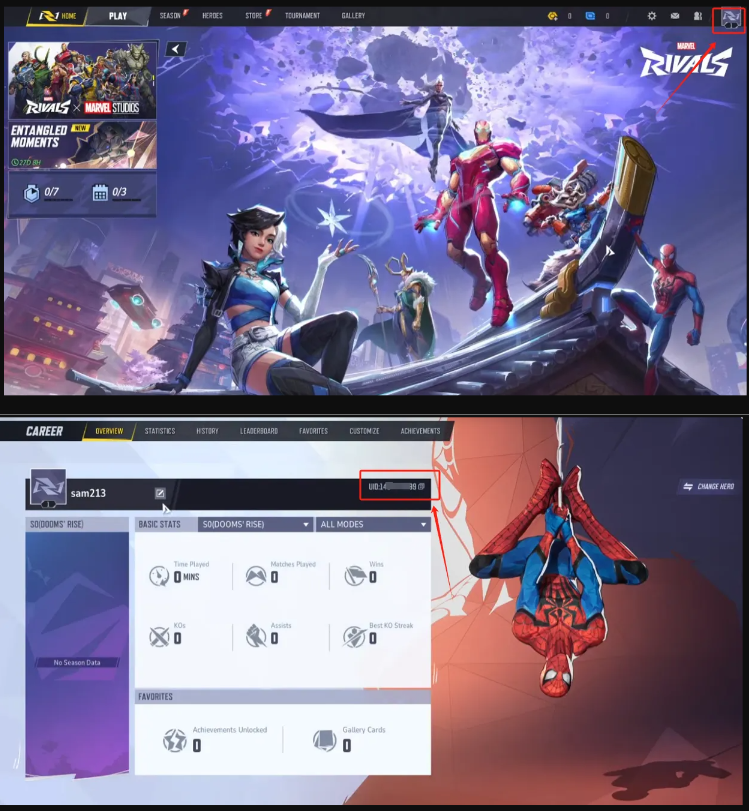
How do I find the Marvel Rivals player ID?
1. Log in to the game using your account.
2. Tap the "Avatar" icon in the upper right corner of the home screen.
3. Your Marvel Rivals Player ID will be displayed on the screen.
Introduction to Marvel Rivals
Marvel Rivals is a superhero team-based PvP shooter.
Players can assemble an all-star Marvel squad, combine character abilities to create strategies, and unleash unique team-up skills while battling across dynamic, destructible battlefields in the Marvel Universe.
The roster is extremely rich, featuring classic heroes and villains from franchises such as the Avengers, Guardians of the Galaxy, and X-Men, giving players plenty of iconic characters to choose from.
The game’s 6v6 matches are fast-paced and highly exciting. With complex environments, constantly shifting battlefields, and spectacular hero and villain abilities, the action can explode in just seconds when powers are combined.
Hero synergy is a major highlight. Unique character pairings can trigger surprising team-up skills, such as Rocket Raccoon riding Groot or Hulk powering up Iron Man. With so many tactical combinations, turning the tide of battle is absolutely possible.
The game also features impressive environmental destruction. From Asgard to Tokyo 2099, players can use superpowers to reshape the environment, create terrain advantages, find cover, and even forge new combat opportunities, adding more ways to secure victory.
What Are Marvel Rivals Lattices? What Are They Used For?
Lattices are a premium universal currency in Marvel Rivals, mainly obtained through top-ups.
Their main uses include:
Buying cosmetic items:
Lattices are mainly used to purchase cosmetic items in the game, such as hero costumes (skins), sprays, emotes, and name cards. These items only provide visual changes and do not affect game balance or fairness.
Unlocking premium content:
Players can use Lattices to purchase the in-game Battle Pass and unlock more premium content and rewards. The pass usually includes multiple tiers, with each tier offering different rewards such as skins, sprays, and Units.
Exchanging for other currencies:
Lattices can be exchanged at a 1:1 ratio for another in-game currency called Units. Units are relatively easier to obtain and are widely used for daily purchases, such as redeeming certain store items or participating in limited-time events for more rewards.
How to Get Lattices
Top-up purchase (main method):
Lattices are mainly obtained through top-ups. The game offers multiple recharge tiers, allowing players to choose the amount that best suits their needs. Recharge rates usually range from RMB 6 for 100 Lattices at the lowest tier, up to RMB 648 for 11,680 Lattices at the highest tier.
Battle Pass rewards:
Lattices may also be distributed as rewards through the Battle Pass. However, topping up remains the primary way to acquire them.
Specific missions (small amounts):
Although Lattices can also be earned in small amounts by completing certain missions, this method provides only limited quantities and cannot meet larger player demand.
Why Top Up Lattices?
In Marvel Rivals, topping up Lattices is mainly done to obtain the game’s premium universal currency, which can then be used to buy cosmetics, unlock premium content, or exchange for other currencies. This allows players to stand out from others and enjoy a better overall gaming experience.
How to Top Up Marvel Rivals Lattices on Kardz
1. Select the Marvel Rivals package product you need.
2. Choose the quantity, then fill in your user information.
3. Select your preferred payment method and complete the payment.
4. Check the top-up status in the order center. Your Lattice package will be credited to your account within a few minutes.
Why Choose Kardz for Marvel Rivals Top-Ups?
Fast delivery, no waiting
After payment is completed, the top-up is usually credited automatically within minutes, with no manual redemption or long wait required.
Discounted prices, better value
Compared with official channels, Kardz often offers limited-time discounts, bundle deals, or bonus credits, allowing you to get more value for the same budget.
Safe and reliable, with fraud protection
Kardz is a legitimate third-party platform that uses encrypted payment systems and direct official-connected channels, helping avoid account risks and ensuring a secure top-up process.
Multiple payment methods, flexible and convenient
It supports localized payment options such as credit cards, convenience store payments, and e-wallets like PayPal, adapting to different player preferences.
One-click operation, simple process
It only takes three steps: choose the product, enter the required information, and complete the payment. There is no complicated process, and even beginners can get started easily.
Frequently Asked Questions (FAQ)
Is there any account risk when topping up on Kardz?
Please rest assured that our top-up channels come from suppliers who cooperate with official partners and will not put your account at risk of being banned.
Is it safe to pay on Kardz?
Yes. We support multiple secure payment methods, including Visa, MasterCard, PayPal, and more.
How long does the top-up take to arrive?
Top-ups are usually completed within 10 to 30 minutes. If there is any delay, feel free to contact our online customer service for assistance.