

 DIRECT TOP-UP

 CARD
CARD
Genshin Impact


 300 Genesis CrystalAfter Coupon$ 4.05
 980 Genesis CrystalAfter Coupon$ 12.67
 1980 Genesis CrystalAfter Coupon$ 25.34
 3280 Genesis CrystalAfter Coupon$ 42.24
 6480 Genesis CrystalAfter Coupon$ 82.47
 Blessings of the Empty MoonAfter Coupon$ 4.05
 Pearl ChronicleAfter Coupon$ 8.5
 Song of the PearlAfter Coupon$ 16.84
Service Overview
Top-up Instructions
【Game】Genshin Impact
【Platform】Android / iOS
【Available Regions】America / Europe / Asia / Hong Kong / Taiwan
【Login Methods】Google, or Email
【Required Information】Account,Password,Character ID (UID)
【Top-up Method】Manual Account Login Top-up
【Top-up Process】Place an order → Complete payment → Fill in the required information → Contact customer service → Top-up completed
【Processing Time】Approximately 15 minutes. (In special circumstances, the actual processing time may vary.)
Notes
Since Facebook accounts may be temporarily locked due to login attempts from a different location, users who log in with Facebook are strongly advised to link at least two login methods before placing an order.
Important Information
Please ensure that your account information and password are entered correctly to avoid delays in processing your order.
Do not log in to the game while the top-up is in progress, as this may cause the order to become stuck or delayed.
Once the top-up is completed, our customer service team will notify you via SMS as soon as possible.
To keep your account secure, please change your password promptly after the top-up has been completed.
About Genshin Impact:
Genshin Impact is an action RPG created by miHoYo and published globally by Cognosphere (also known as HoYoverse). The game features an anime-style open world and an action-based combat system involving character switching and the use of elemental magic.
With the V6.1 update, Genshin Impact introduced a brand-new UGC mode—Starry Sky Realm—which has been highly anticipated since its announcement. This mode allows players to design, generate, and share their own game content using various development tools.
Why choose to recharge Genshin Impact on Kardz?
Kardz.com is a professional and secure global game trading platform, offering services such as game top-ups, account trading, and item trading.
We provide more professional, secure, and convenient services to players worldwide, supporting popular games like PUBG, Genshin Impact, Free Fire, and Mobile Legends. More importantly, we offer 24/7 online customer service and various payment methods.
Regarding lower prices, in addition to some occasional promotional events, each game has different levels of discounts; for example, some items can have discounts of up to 20%.
After the 4.1 update, MiHoYo reset the double reward recharge event. When you recharge Genshin Impact on Kardz.com, if it's your first time recharging Genesis Crystals at that level, you will receive double rewards for every recharge level. However, if you have previously recharged Genesis Crystals at that level through MiHoYo, you will not receive double rewards on Kardz.
How to top up your Genshin Impact account on Kardz?
1.Go to the official Kardz website, select your language and currency, and log in.
2.Select the specific amount and quantity, enter your Genshin Impact UID and server, and then click "Top Up Now".
3.Choose your preferred payment method and complete the payment.
4.Check the top-up status in the order center. After the top-up is complete, check it in the game.
5.If you encounter any problems, please contact customer service (contact information: click the customer service button in the lower right corner of the platform).
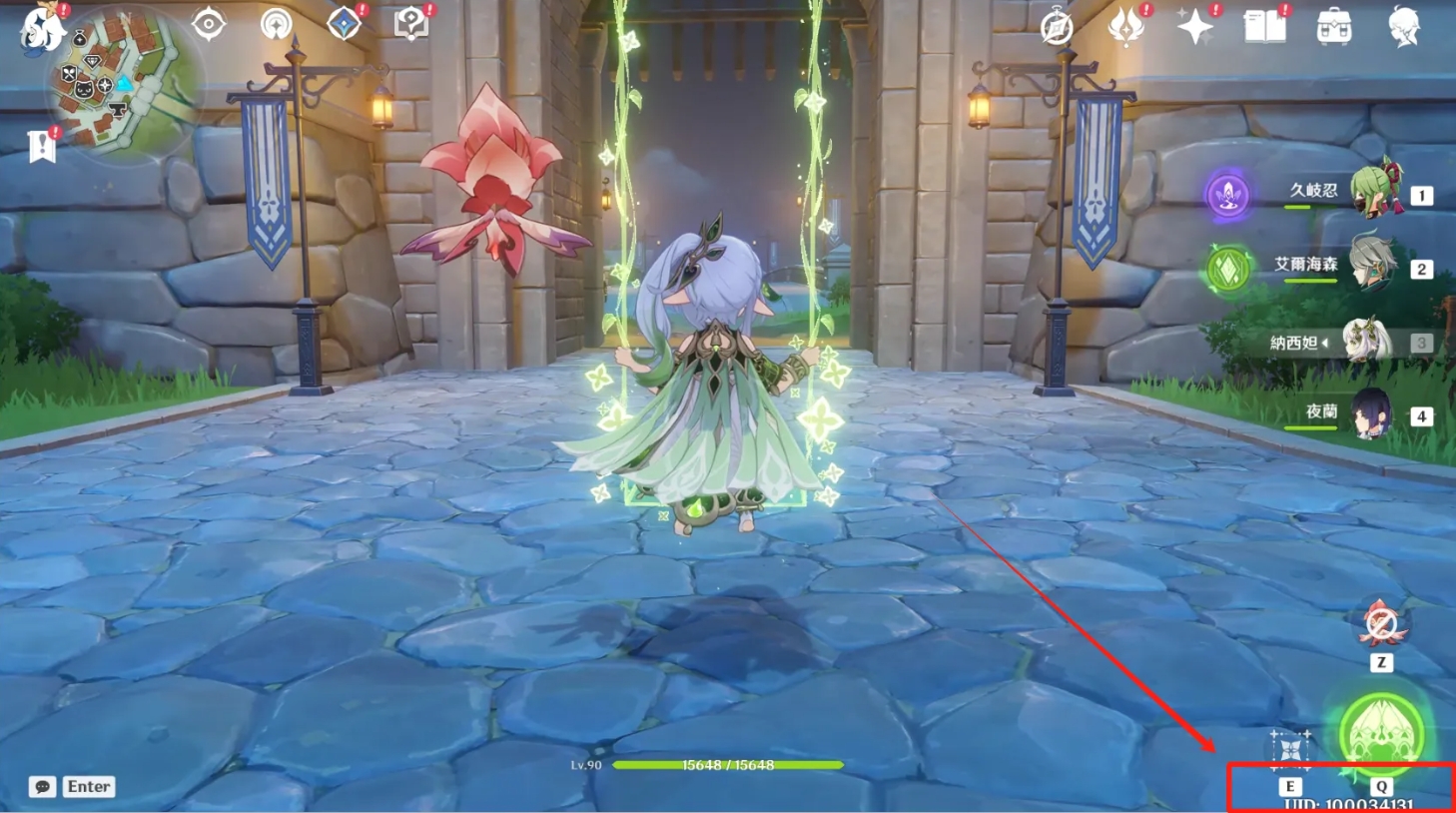
How to find your Genshin Impact UID?
1. Log in to the game using your account.
2. Click the bottom right corner of the screen.
3. Your Genshin Impact international server character ID will be displayed.

















-22047d9ba4e641dca12ee50422849ab3.jpg?x-oss-process=image/resize,m_fill,h_130,w_97/format,webp "Diffusivity Million Arthur")